
Set up the AI agent to answer visitors
Turn on Opskeet's AI agent, choose when it answers, and set its limits so it replies to visitors from your own knowledge.
The AI agent answers visitors in the chat using only what you teach it. It hands the chat to your team when it can't help.
Before you start
The AI needs knowledge to answer from. Add your website, documents or written answers first: Teach the AI with your website, documents and answers. Without knowledge, it hands every chat to your team.
Only owners and admins can change AI settings. Everyone else sees them read-only.
Turn it on
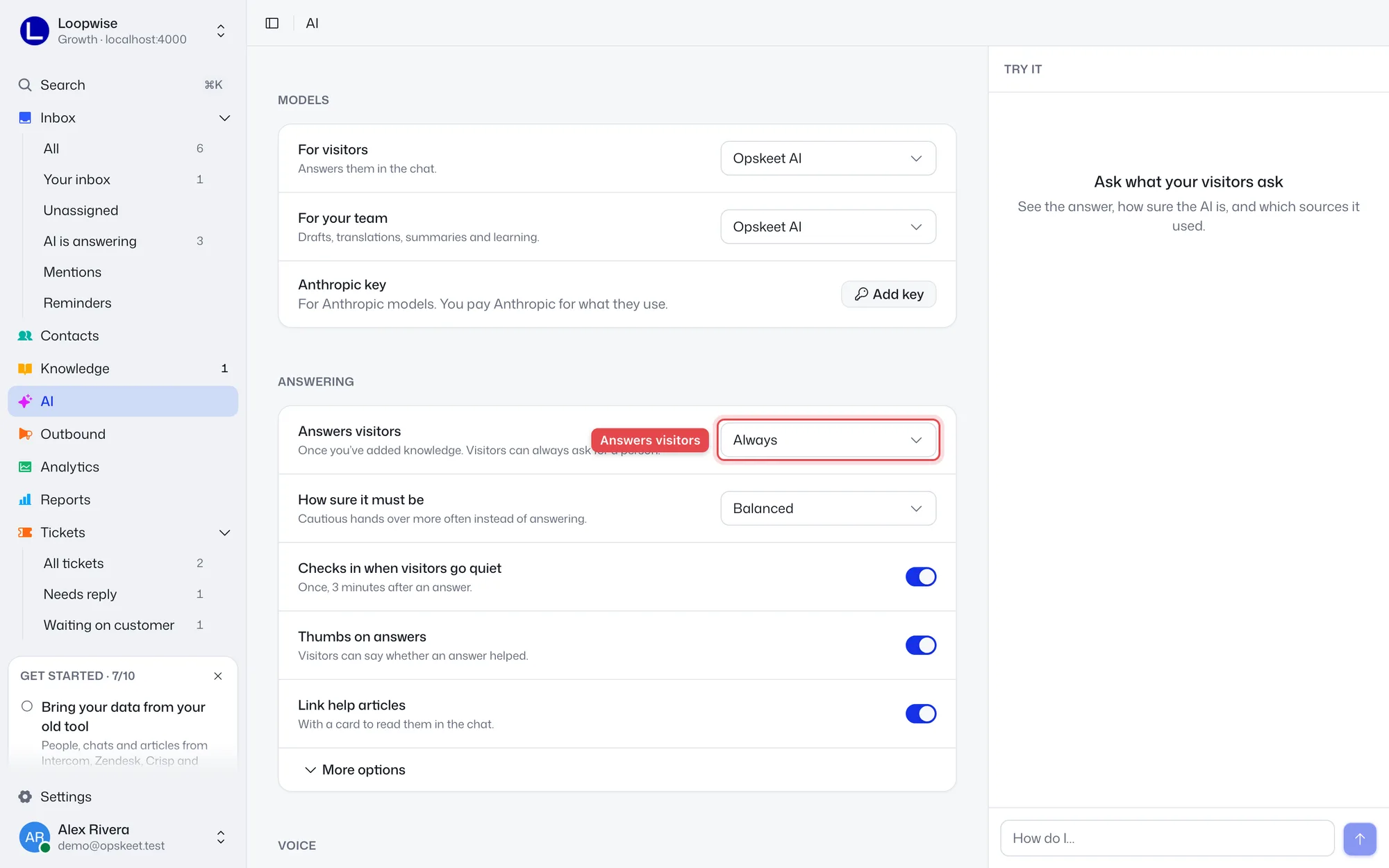
- Click AI in the sidebar.
- Under Answering, set Answers visitors:
- Always: it answers every new chat.
- Outside business hours: it answers only when your team is closed. Needs business hours.
- When nobody replies in time: it steps in if no teammate replies within Waits for the team (3 minutes by default, up to 60).
- Off: chats always go to your team.
- Click Save in the bar at the bottom.
Changes aren't live until you save. Projects made through setup start with the AI off, so you can try it first.
Answering settings
| Setting | Default | What it does |
|---|---|---|
| How sure it must be | Balanced | Cautious hands over more often instead of answering. |
| Checks in when visitors go quiet | On | Asks once, 3 minutes after an answer, whether it helped. |
| Thumbs on answers | On | Visitors can rate each answer. |
| Link help articles | On | Shows a card to read the article in the chat. |
| Hands over after | 10 replies | In one chat, so nobody goes round in circles. Under More options. |
| Replies a day, at most | 500 | After that, chats go to your team until tomorrow (UTC). Under More options. |
The daily limit keeps costs in check if someone floods the chat. When it's reached, your team gets a note in each chat it hands over.
When the AI doesn't answer
It stays out of a chat when:
- A teammate has replied (internal notes don't count).
- The chat is a ticket.
- It came by email and AI answers emails is off in Settings → Email.
- It looks like spam.
Visitors can always click Talk to a person in the widget.
Next steps
Did this help?
Related articles
- Teach the AI with your website, documents and answersAdd your website, PDFs, Word files and written answers to Opskeet's Knowledge so the AI agent answers visitors correctly.
- Written answers: teach the AI what isn't on your siteAdd written answers so Opskeet's AI knows policies and facts that aren't on your website. Import and export them as CSV.
- Test the AI before visitors see itAsk Opskeet's AI questions in the Try it panel, see how sure it is and which sources it used, and fix wrong answers.
- Set the AI's name, tone, guidelines and guardrailsGive Opskeet's AI agent a name and brand voice, tell it how to answer, and set guardrails for what it must never do.
- When the AI hands a chat to your teamLearn when Opskeet's AI agent hands a chat to a person, what your team sees, and how to take over or hand a chat back.