
Find and filter chats in your inbox
Learn the inbox views, tabs, search, filters and bulk actions so you can find any chat or email and clear your queue fast.
The inbox holds every chat and email in one list. Views, tabs, search and filters help you find what needs you.
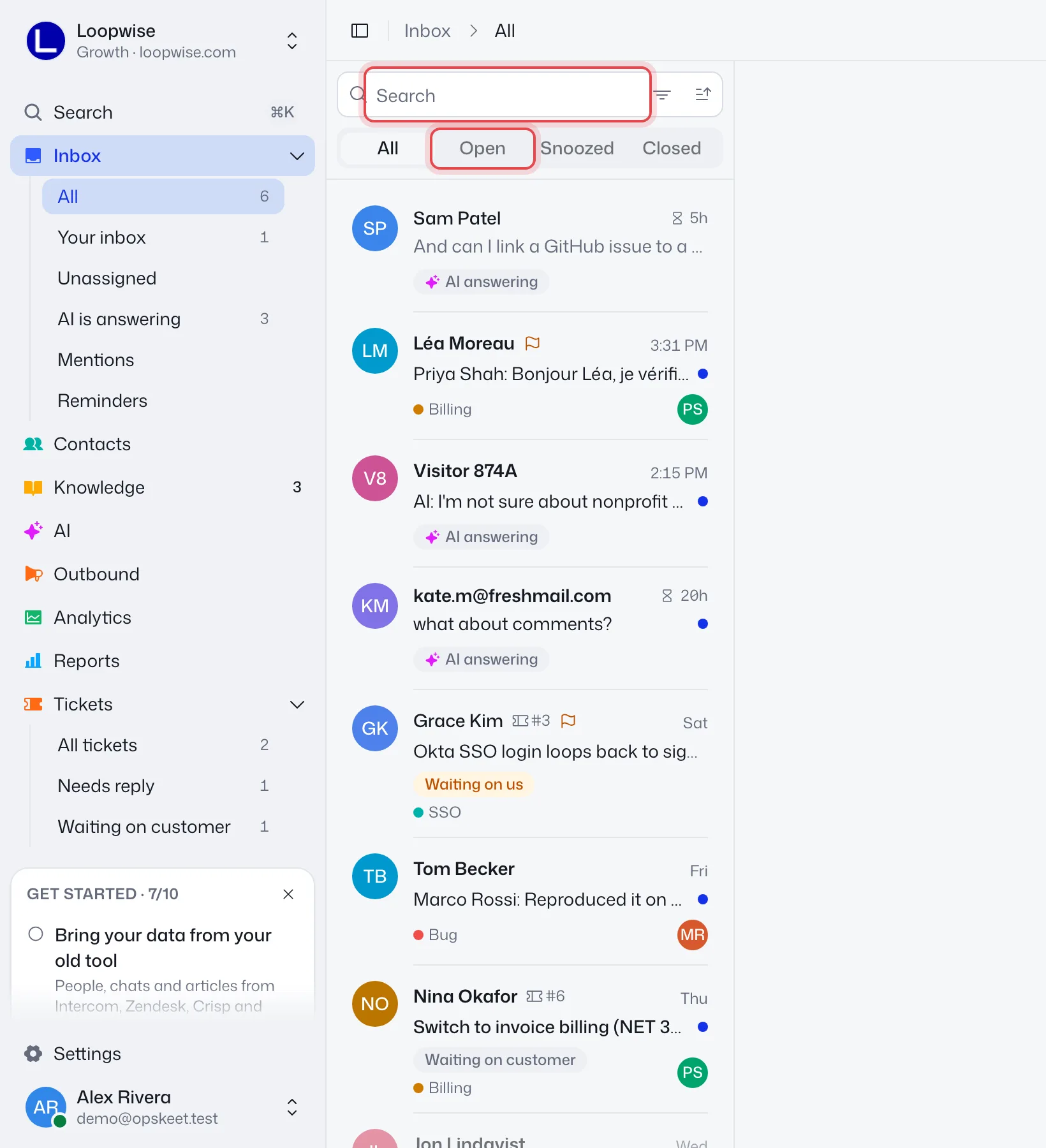
Views
Pick a view under Inbox in the sidebar.
| View | Shows |
|---|---|
| All | Everything except spam |
| Your inbox | Chats assigned to you |
| Unassigned | Chats nobody has and the AI isn't answering |
| AI is answering | Chats the AI is handling |
| Mentions | Chats where a teammate @mentioned you |
| Reminders | Chats where you have an open or overdue reminder, soonest first |
| Spam | Only appears when there is spam |
The badge counts unread chats that are yours or nobody's, and not with the AI. With tickets on, a separate Tickets item has its own views.
Tabs
Above the list: All, Open, Snoozed and Closed. In ticket views, Closed reads Solved, and only All tickets has it. Reminders has no tabs. A snoozed chat is an open one with a wake-up time in the future.
Search and filter
- Press / to search. It looks in messages, notes, names and emails.
- Use the filter icon in the search box to show Chats and emails, Chats or Emails. With tickets on you can also filter by ticket status.
- Use the sort menu for Newest first or Needs attention first. It shows on the All and Open tabs.
- When you arrive from Reports or ⌘K, a chip like "Tagged Billing" shows what's filtered. Click its × to clear it.
Read the list
Each row shows the name, time and a preview. While a visitor waits, the time becomes an hourglass with the wait. It turns amber as your reply target nears and red once missed.
Badges show tags, the assignee, a reminder, Frustrated, AI answering and why the AI handed over. Ringed avatars mean a teammate has the chat open.
Close many at once
Hover a row's avatar to get a checkbox. Select rows, then click Close, Reopen or Solve. Use Undo in the toast if you slip. On a phone, swipe a row right.
Press J and K to move between chats. After you close or snooze one, the next opens by itself.
Can't find a chat?
- Check the tab. A closed chat is under Closed.
- Chats the AI is answering are not in Unassigned. Find them in AI is answering or All.
- Emails marked as spam are in Spam.
Related: keyboard shortcuts, close and reopen chats.
Did this help?
Related articles
- Reply to customers: send, quote, attach and editSend replies in the inbox, quote a message, attach files, use fill-ins, and edit or delete a message after you send it.
- Internal notes and @mentions for your teamLeave private notes on a chat and @mention a teammate so they get notified. Visitors never see notes, only your replies.
- Create and use canned repliesSave answers you give often and insert them with a slash. Create one from the reply box, with fill-ins like the customer's first name.
- Assign conversations and auto-assignAssign chats by hand or let Opskeet spread them evenly across online teammates, with skills, waiting rules and pass-on.
- Tag chats and contacts to sort by topicCreate tags, put them on chats and contacts, require a tag before a chat can be closed, and find tagged chats again later.