
Write and publish help center articles
Write help articles in Opskeet's editor, add images and links, set the title, description and address, and publish when ready.
On this page
Articles live under Knowledge → Articles. They stay private drafts until you publish.
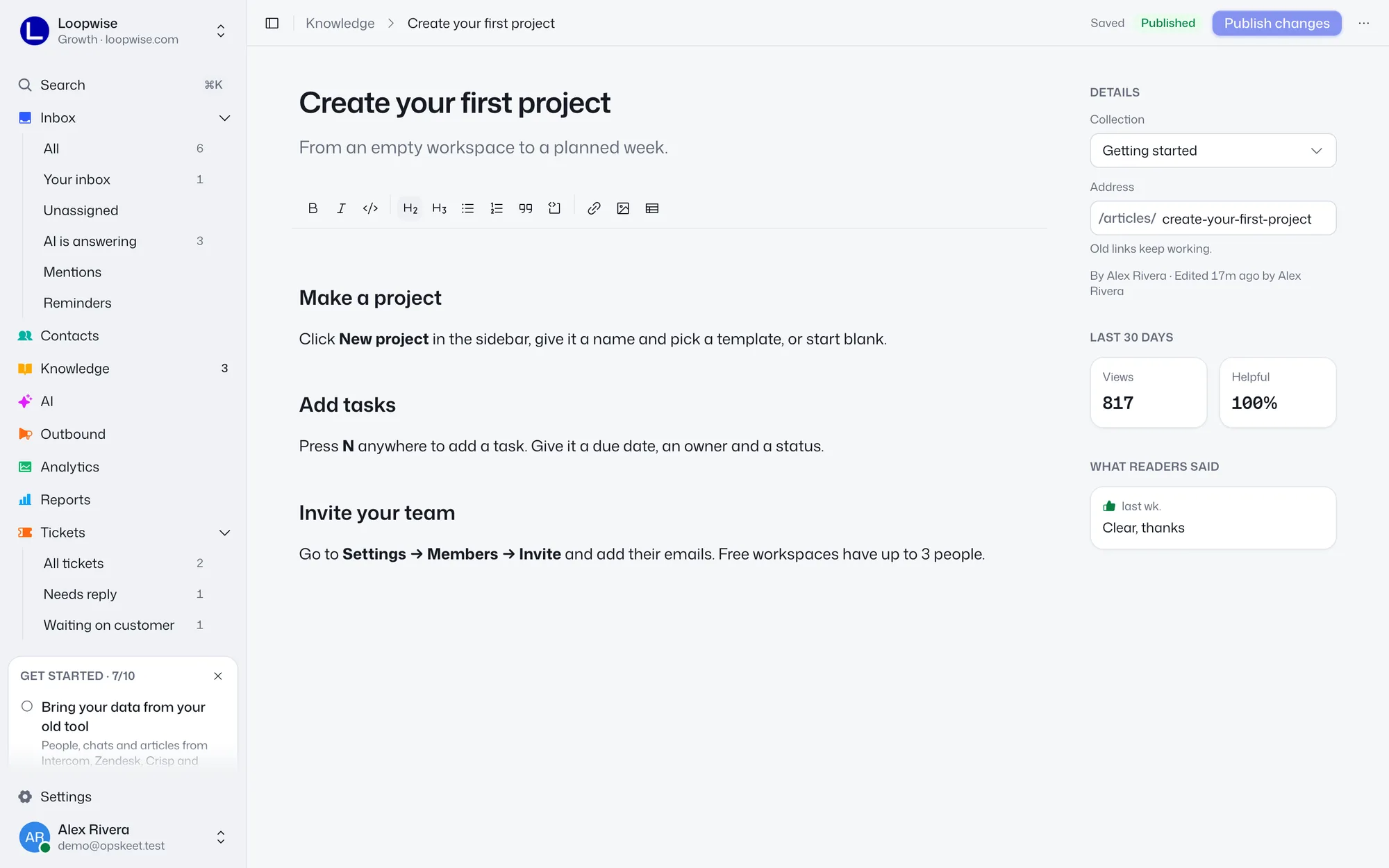
Write an article
- Go to Knowledge → Articles and click New article. To add it to a collection, use the + on that collection.
- Add a Title (up to 200 characters) and a Description ("A line on what it answers", up to 300). The description is the subtitle and also the search engine description.
- Write in the body. Use the toolbar for Bold, Italic, Code, Heading, Subheading, List, Numbered list, Callout, Code block, Link, Image and Table.
Edits save on their own. The editor shows Saving…, Saved or Not saved. ⌘S (Ctrl+S on Windows) saves right away.
Images
Click Image in the toolbar, or paste or drop an image. PNG, JPEG, WebP or GIF up to 5 MB each.
Links
Select text, click Link, then paste a link or search for another article. Links to articles stay working if you move them or change your site address. Remove link takes one off.
Details sidebar
| Field | Notes |
|---|---|
| Collection | Pick where it lives, or none. See Collections. |
| Address | /articles/your-address. Follows the title until the first publish. After that, changing it keeps old links working. Lowercase letters, numbers and dashes. |
After publishing, you also see views and helpful % for the last 30 days, and What readers said.
Publish
Click Publish (⌘Enter). Publishing needs a title. The button is off when there's nothing new to publish. The site shows only the last published version, so later edits stay private until you click Publish changes.
Statuses in the list:
- Draft: never published, or unpublished.
- Published.
- Edited: published, with changes not yet live.
Publishing is for owners and admins. Agents write drafts, can't change a published article's collection or address, and see "An owner or admin publishes your changes."
Unpublish or delete
Open the ⋯ menu:
- Unpublish takes it off the site, search and the AI. The draft text is kept.
- View on help site opens the live article.
- Delete can't be undone. Agents can delete only their own articles that were never published.
Two people editing
If someone else saved newer changes, you see "Your latest changes aren't saved." Click Copy mine, then Reload to get the newest version.
Related
Did this help?
Related articles
- Write help articles with AI from chats and searchesLet Opskeet's AI draft a help article from a real chat or a search nobody could answer, then review, edit and publish it when ready.
- Organize help articles into collectionsGroup help center articles into collections with names, icons and descriptions, nest one level, and reorder by dragging.
- Use your own domain for your help centerPut your Opskeet help center on help.yourcompany.com by adding a CNAME and a TXT record at your DNS provider, with the status messages.
- Find missing help articles from feedback and searchesSee what readers said, which searches found nothing and which questions the AI couldn't answer, then write the missing articles.
- Show your help articles inside the chat widgetLet visitors search and read your help center in the Opskeet chat widget, pick top articles, and open articles from your own site.